


Super.
For your business and your people.
Simple.

300,000+ employers trust Rest

37 years of experience

8.37% p.a. Growth option returns*


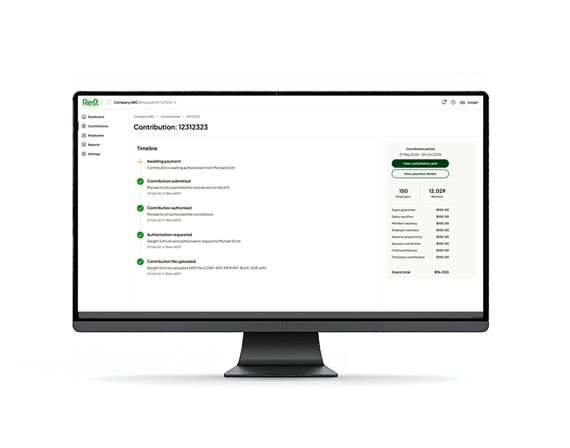
Rest Pay – getting you ready for Payday Super
A feature-filled clearing house that helps you adapt to the government’s Payday Super legislation.
- No cost for Rest default employers
- Payday Super ready
- Compliance made easy
- Enhanced security protection to help protect your data
- Helps process contributions faster
- Easy to use

Rest Super – a partner for your business
A MySuper business product with default insurance tailored to salary.
- Competitive fees
- Diverse investment options
- Insurance cover
- Competitive long-term returns
- Trusted by many of Australia’s largest employers
- Award winning service team

Retiring Well at Myer Program
With 32% of Myer’s workforce aged 55 and over, the company recognised the impact of retirement uncertainty on their team’s wellbeing. Myer and Rest joined forces to launch the Retiring Well at Myer program, a national initiative designed to help employees navigate the transition to retirement and life after work.

When do I need to pay SG contributions by?
Who is eligible to receive super?
What do I need to pay SG contributions?


Live chat
Start a Live Chat with one of our agents,
Monday to Friday 8am to 6pm (AEST/AEDT)
